
Help / Billing and free minutes
Billing and free minutes
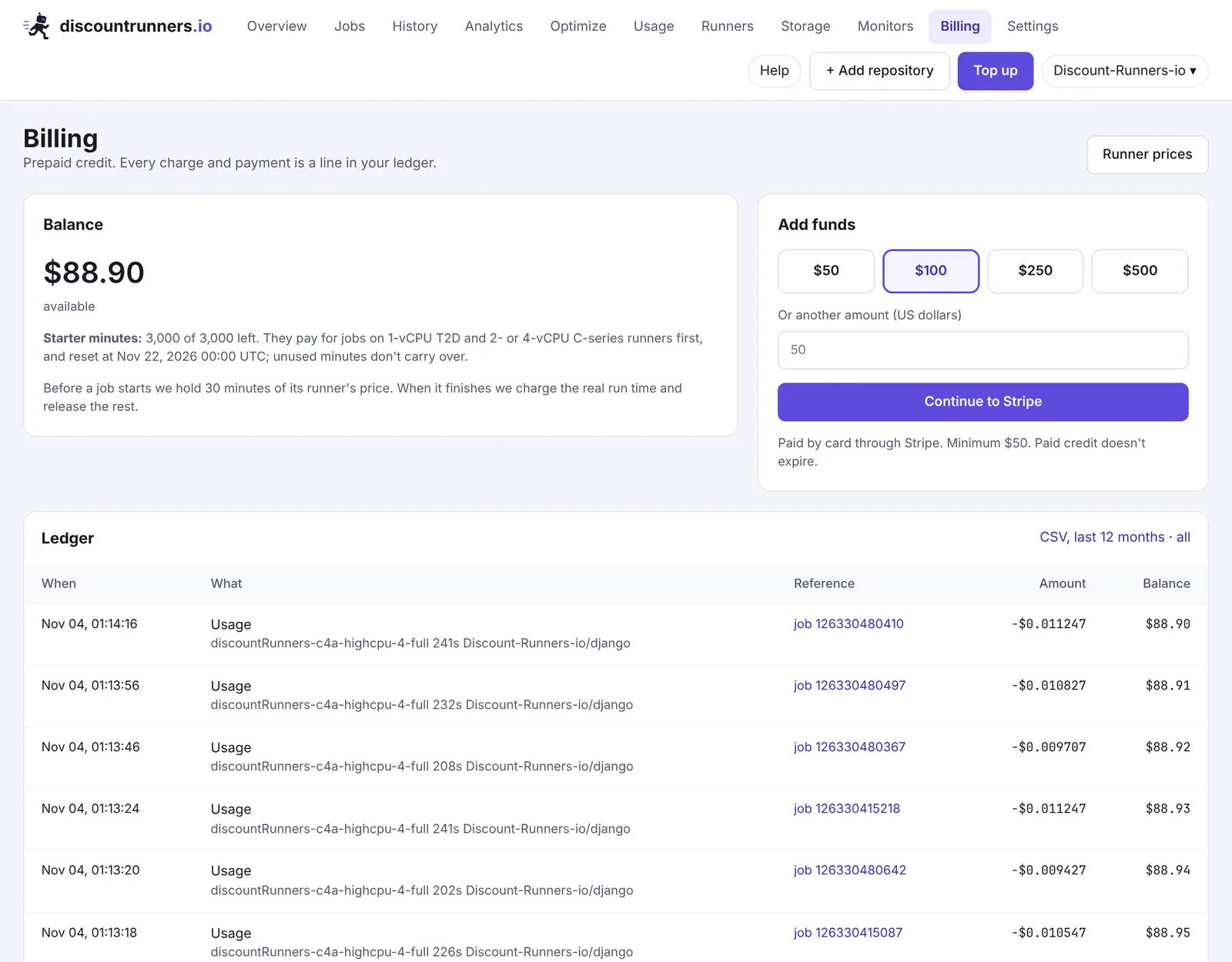
DiscountRunners is prepaid. You add credit, jobs draw it down per second, and every charge and payment is a line in your ledger.
Free Starter minutes
Every eligible GitHub account at least 30 days old gets 3,000 free Starter minutes each month, starting on the day you sign up. They pay for jobs on the 1-, 2- and 4-vCPU sizes before any credit is used. Unused minutes expire at midnight UTC on each monthly anniversary of sign-up and do not carry over. Each person gets one free allowance: if you install the app on several accounts, only the first gets it. Billing shows how many minutes are left and when they reset.
Adding credit
Only an admin of the account can top up. Pick an amount on Billing, or enter your own from $50 to $5,000, and pay by card through Stripe Checkout. Credit appears as soon as Stripe confirms the payment, usually within a few seconds. Paid credit does not expire, and any unused paid balance is fully refundable: ask support and we refund it. Free credit and Starter minutes are not refunded.
Auto-recharge
An admin can save up to five cards on Billing and turn on auto-recharge. You choose a threshold, an amount to add and a monthly maximum. When available credit falls below the threshold, we charge your primary card and add the amount to your credit. If the primary card is declined we try each backup card in order. A card whose bank asks for a check you'd have to be there for, such as 3-D Secure, counts as declined.
If every card is declined, auto-recharge pauses until an admin turns it back on. Once a calendar month's recharges reach the monthly maximum (UTC), we stop until the 1st. The people on your credit emails list get an email for every recharge, failure and stop. Each recharge is a top-up in your ledger, and cards are stored by Stripe, not by us.
How a job is charged
- Per second, one-minute minimum. A job is billed from the moment it starts on our runner until it finishes, at its class's price per minute from the price book, with a 60-second minimum. Nothing is charged while a job waits.
- GPU startup. A GPU job is billed 3.5 minutes of its runner's price for starting its VM, then per second from the moment it starts, with no minimum. Its hold covers the startup too.
- Holds. Before a job starts we hold 30 minutes of its runner's price. When it finishes we charge the real run time and release the rest. Overview and Billing show held credit apart from available credit.
- Stopped runners are not charged. When the cloud provider stops a runner mid-job, that attempt is refunded and the job is re-run for you. See Automatic re-runs.
- Storage and extras are charged daily: Actions cache, sticky disk snapshots, repository images, a static egress IP. Their prices are in the price book.
Discounts
If we agree a discount with you, it is a percentage off your runner time from a start date, and to an end date if it has one. It comes off jobs, SSH debug time, image bakes and warm pools whose runner starts while it lasts. Storage and the static IP stay at their listed price. Billing, Usage and Runners show the discount and its dates, each discounted ledger line names it, and both CSV downloads have a discount_usd column with what it took off. Starter minutes are used before any paid time, as always.
When credit runs low
A workflow run starts only when its predicted charge fits your available credit. A run that does not fit waits, and Overview says so; add funds and it starts within seconds. If credit runs out while a run is going, we cancel the run and stop its runners, and you re-run it on GitHub after topping up. Under Settings → Credit emails, list up to five addresses to be told when runs wait for credit or are cancelled.
Spending caps
An admin can set a monthly spending cap under Settings. Once a new job's hold would pass the cap, jobs wait until the 1st of the next month (UTC) or until the cap is raised; running jobs finish. New accounts also carry a daily cap for their first 30 days. Usage shows the month's spend against the cap.
The ledger
Billing lists every entry with its time, kind, reference and the balance after it: top-ups, job charges linked to their job, refunds, daily storage charges and adjustments. Download the last 12 months, or everything, as CSV. The ledger is the balance of record; Stripe only moves the money.
Seeing what things were charged
- Each job's page itemizes its charge.
- Usage totals a month by day and by repository.
- Job logs can end with the job's estimated charge and the same job on GitHub-hosted runners of the same size.
- Pull request comments, off until an admin ticks a repository in Settings, post one comment per pull request with what its runs were charged and what you saved against GitHub-hosted runners with the same number of physical cores. Pull requests from forks get no comment.
Screenshots and videos in Help are a demonstration rebuilt from our own benchmark jobs. The jobs, steps, run times and charges are real; queue waits and the CPU, memory, disk and network graphs in them are illustrative, not measurements.