
Help / Runner labels and sizes
Choose a GitHub Actions runner
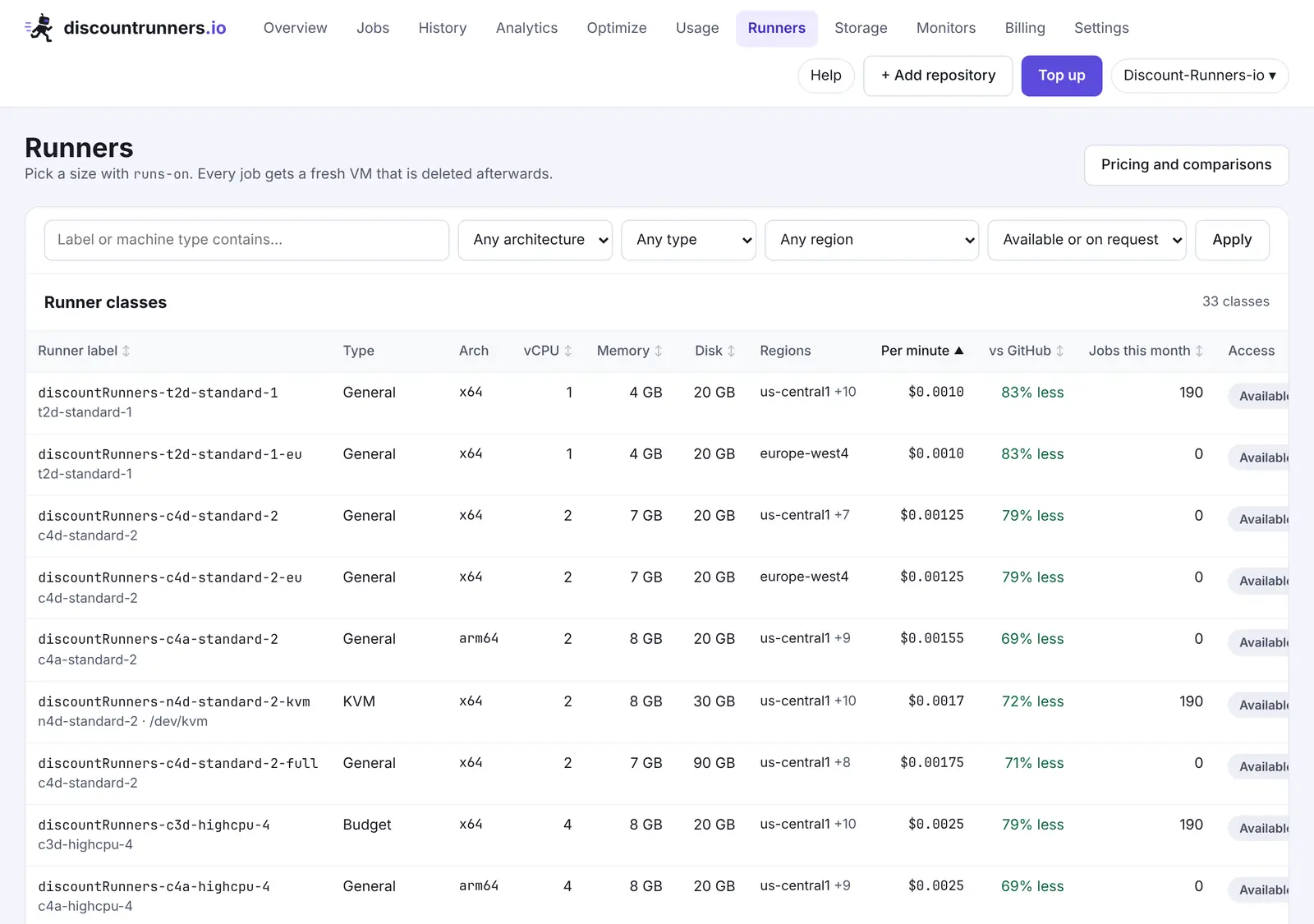
Currently listed architectures: arm64, x64. Sizes span 1–96 vCPU. The price book is the source of truth for each label's memory, disk, regions and access tier, and the console's Runners page shows the same list for your account.
How a label is built
A job asks for a runner with runs-on. The label names the class; optional parts after it change what the VM boots or which job it belongs to. Labels match without regard to case.
| Label | What it does |
|---|---|
discountrunners-<N>vcpu | A size: 1, 2, 4, 8, 16 or 32 vCPU (64 and 96 on request), about 4 GB of memory per vCPU, on GitHub's ubuntu-latest image. |
…-arm | The same size on ARM64. |
…-lite | The small image: a short toolchain that boots fastest; fetch other tools with setup actions. |
…-24.04 | Pins Ubuntu 24.04 instead of following ubuntu-latest. |
discountrunners-ubuntu-latest | GitHub's names, also -ubuntu-24.04, -ubuntu-24.04-arm and -ubuntu-slim: the size GitHub gives that repository, 2 vCPU for a private one and 4 for a public one. |
<class>/image=<name> | Boots a repository image baked from .discountrunners/image.yml. If the image is missing or still baking, the job boots the class's own image, so the label never makes a job wait. |
<class>/snapshot=<name> | Boots the disk a previous successful default-branch job of a private repository saved with dr-snapshot save. |
<class>/key=<key> | Gives the job a runner of its own: GitHub can hand that VM to no other job. Use it so each job's measurements stay its own. The key is 1 to 120 characters of letters, digits, _, . and -, and comes last. |
discountrunners-gpu-t4 | An NVIDIA GPU runner, also discountrunners-gpu-l4. Add /ondemand right after it to run on on-demand capacity. |
discountrunners-auto/key=<key> | The self-sizing label: we choose the size for each run from the job's past runs. |
A key that is unique per job and run works well:
runs-on: discountRunners-2vcpu/key=${{ github.run_id }}-testx64 and ARM64
Choose the architecture your binaries and container images support. ARM64 requires ARM-compatible dependencies; it is not an automatic substitute for x64. Windows and macOS runners are coming soon. Classes marked “on request” require an account grant before a job can use them; ask for one with Request access on the Runners page.
When you compare sizes, compare physical cores. An x64 vCPU on our sizes from 2 vCPU, and on GitHub's x64 runners, is a hyperthread: half a physical core. An ARM64 vCPU, and the 1-vCPU size's, is a whole core. The “vs GitHub” column on the Runners page compares with GitHub's Linux runner with the same number of physical cores.
GPU runners
Two GPU runners are offered on request, on the full image, with the NVIDIA driver loaded and Docker set up for --gpus all:
| Label | GPU | CPU and memory |
|---|---|---|
discountrunners-gpu-t4 | NVIDIA T4, 16 GB | 8 vCPU (4 physical cores), 30 GB |
discountrunners-gpu-l4 | NVIDIA L4, 24 GB | 8 vCPU (4 physical cores), 32 GB |
GitHub's GPU runner has 4 cores (hyperthreads) and a T4, so both of ours have at least as much CPU. discountrunners-gpu-t4/ondemand and discountrunners-gpu-l4/ondemand run the same runner on on-demand capacity at a higher price; other label parts such as /key= follow it. A GPU runner takes about a minute longer to start while its driver loads. Ask for access with Request access on the Runners page, which also shows each price.
runs-on: discountrunners-gpu-t4
steps:
  - run: nvidia-smi
KVM and FreeBSD
Labels with -freebsd after the size, such as discountRunners-2vcpu-freebsd, run the job on FreeBSD 15.1 itself, on x64 or ARM64 (-freebsd-arm). The runner is the community github-act-runner, because GitHub's runner has no FreeBSD build. JavaScript actions run on the image's Node 24 and shell steps on sh or bash. Docker actions, service containers and job containers do not run; use a -kvm label for those. The image carries git, bash, curl, jq, rsync and sudo; install anything else with sudo pkg install -y. Caching, sticky disks and SSH debugging are not available on FreeBSD labels yet.
Labels ending in -kvm provide /dev/kvm for Android emulators and other hardware-accelerated guest VMs; the price book lists them and their prices. FreeBSD runs as a guest VM on them with the vmactions/freebsd-vm action, which boots it in about 20 seconds.
Slim and full images
Slim images carry a small toolchain and fetch additional tools through setup actions. Full images use GitHub's Ubuntu 24.04 build recipes on Google Cloud. Cloud agents, kernels and some software versions differ; inspect the published image reports. Pin tool versions that your workflow depends on.
Regions
Regions across the current catalog: northamerica-northeast1, northamerica-northeast2, us-central1, us-east1, us-east4, us-east5, us-south1, us-west1, us-west2, us-west3, us-west4. Each size runs in a subset, on whichever machine type there has capacity.
What each job's log tells you
Every job's “Set up runner” step names its runner class, the VM's machine type, zone and image, the class price and the job time limit. Its “Complete runner” step can end with the job's estimated charge and what it would have been on GitHub-hosted runners of the same size; an admin turns that summary off under Settings → Job logs.
Compare the whole job
A vCPU count does not establish equivalent performance. Account for memory, setup time, cache behavior, queue time and actual completion cost. The Optimize page measures your own jobs, and the benchmarking guide describes a fair comparison across providers.
Screenshots and videos in Help are a demonstration rebuilt from our own benchmark jobs. The jobs, steps, run times and charges are real; queue waits and the CPU, memory, disk and network graphs in them are illustrative, not measurements.